

Directory Handler — LangGOAP Tier 1 Primer#
A minimal end-to-end GOAP loop, adapted from
GOApy’s directory_handler example.
What this notebook shows#
How to describe a tiny world with boolean state keys.
How to wrap real side-effecting functions as
ActionSpecobjects.How
GoapGraph.invoke()runs the full plan → execute → observe loop.How the planner skips unnecessary work when the goal is already partially satisfied.
Scenario#
We want a workspace directory to exist and contain a .token marker
file. The planner has two actions at its disposal:
Action |
Preconditions |
Effects |
|---|---|---|
|
|
|
|
|
|
A* discovers that create_workspace must come before create_token
because the latter’s preconditions include workspace_exists=True. The
notebook uses a tempfile.TemporaryDirectory so it can run repeatedly
without touching your filesystem.
import tempfile
from pathlib import Path

from tutorial_examples.directory_handler import (
    directory_handler_actions,
    initial_world_state,
)

from langgoap import GoalSpec, GoapGraph, successful_action_names
Action definitions#
The executable bodies live in
examples/tutorials/tutorial_examples/directory_handler.py — the same
module used by the integration test, so this notebook and the test are
exercising identical code.
def create_workspace(ws: dict[str, Any]) -> dict[str, Any]:
    workspace = Path(ws["workspace"])
    workspace.mkdir(parents=True, exist_ok=True)
    return {"workspace_exists": True, "token_exists": _token_exists(workspace)}


def create_token(ws: dict[str, Any]) -> dict[str, Any]:
    workspace = Path(ws["workspace"])
    (workspace / ".token").touch(exist_ok=True)
    return {"token_exists": True}
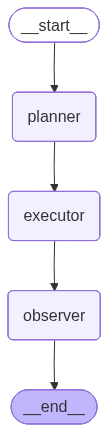
GOAP Execution Graph#
The planner discovers a plan, the executor runs each action, and the observer checks progress — replanning automatically if something fails.
from IPython.display import Image, display

tmp_graph = tempfile.TemporaryDirectory()
graph = GoapGraph(actions=directory_handler_actions(Path(tmp_graph.name) / "ws"))
display(Image(graph.compile().get_graph().draw_mermaid_png()))
Running the loop on an empty workspace#
With nothing in the temporary directory yet, the planner must run both actions in order.
tmp = tempfile.TemporaryDirectory()
workspace = Path(tmp.name) / "goap_workspace"

actions = directory_handler_actions(workspace)
result = GoapGraph(actions=actions).invoke(
    goal=GoalSpec(conditions={"workspace_exists": True, "token_exists": True}),
    world_state=initial_world_state(workspace),
)

print(f"Status:         {result['status']}")
print(f"Workspace dir:  {workspace.is_dir()}")
print(f"Token file:     {(workspace / '.token').is_file()}")

successful = successful_action_names(result)
print(f"Plan executed:  {' → '.join(successful)}")
Partially-satisfied goal#
If the workspace directory already exists, the planner should
skip create_workspace and run only create_token. This is the
key advantage of goal-oriented planning over hard-coded scripts —
the loop automatically adapts to the current world state.
tmp2 = tempfile.TemporaryDirectory()
workspace2 = Path(tmp2.name) / "goap_workspace"
workspace2.mkdir()  # pre-create the workspace directory

actions = directory_handler_actions(workspace2)
result = GoapGraph(actions=actions).invoke(
    goal=GoalSpec(conditions={"workspace_exists": True, "token_exists": True}),
    world_state=initial_world_state(workspace2),
)

print(f"Status:         {result['status']}")
successful = successful_action_names(result)
print(f"Plan executed:  {successful}")
print(f"Token file:     {(workspace2 / '.token').is_file()}")
Goal already fully satisfied#
When the world already matches the goal, A* returns an empty plan and the executor runs nothing. Ambient idempotency is a nice side-effect of goal-driven planning.
tmp3 = tempfile.TemporaryDirectory()
workspace3 = Path(tmp3.name) / "goap_workspace"
workspace3.mkdir()
(workspace3 / ".token").touch()

actions = directory_handler_actions(workspace3)
result = GoapGraph(actions=actions).invoke(
    goal=GoalSpec(conditions={"workspace_exists": True, "token_exists": True}),
    world_state=initial_world_state(workspace3),
)

print(f"Status:         {result['status']}")
successful = successful_action_names(result)
print(f"Plan executed:  {successful}")
Visualizing the plan#
Once the planner has produced a plan, we can render it in ASCII,
Mermaid, or Graphviz DOT. In Jupyter, plan.visualize(format="auto")
returns an IPython.display.Markdown that renders Mermaid inline.
# Plan the empty-workspace scenario directly to inspect the plan object
from langgoap.planner.astar import plan as astar_plan
from langgoap.state import PlanningState

tmp4 = tempfile.TemporaryDirectory()
workspace4 = Path(tmp4.name) / "goap_workspace"
actions = directory_handler_actions(workspace4)

state = PlanningState.from_dict(initial_world_state(workspace4))
plan_obj = astar_plan(
    state,
    GoalSpec(conditions={"workspace_exists": True, "token_exists": True}),
    actions,
)
print(plan_obj.to_ascii())
Plan (2 steps, cost=2)
├── [0] create_workspace
├── [1] create_token  (after: [0])
Summary#
You’ve just seen the simplest possible end-to-end LangGOAP loop:
Describe world state as a plain
dict[str, Any].Wrap your side-effecting functions in
ActionSpecobjects that declare preconditions and effects.Call
GoapGraph(actions).invoke(goal, world_state)and let the planner discover the execution order.
The planner adapts to partially-satisfied goals, and Plan.to_ascii()
lets you inspect what it produced. Everything in this notebook is
verified by
tests/integration/test_directory_handler.py.